Oracle Apex Interactive Grid
Javascript tweeks for IG
Sometimes you want to Hide and Show Columns in another Grid based on selected row on Master Grid.
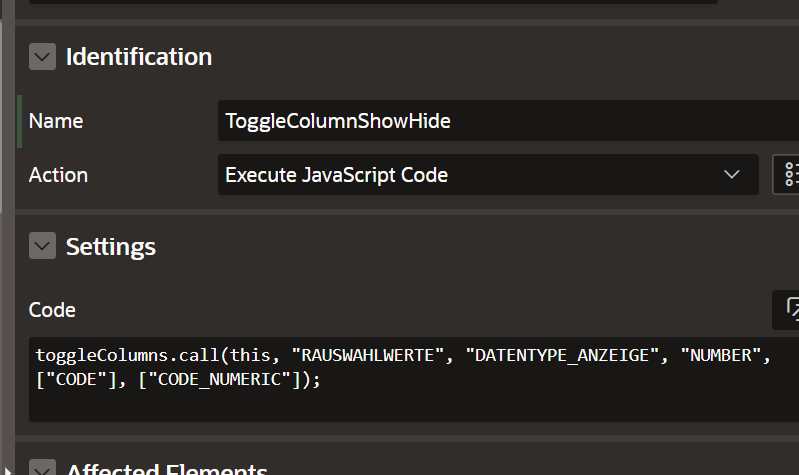
I wrote a small but effective Js Function that handels this for me:
// within IG
// View Columns or ShowColumns

function toggleColumns(regionName, columnToCheck, expectedValue, columnsToHide, columnsToShow) {

    const model = this.data.model,
        records = this.data.selectedRecords;
    let values = records.map(r => model.getValue(r, columnToCheck));

    var vGrid = apex.region(regionName).widget().interactiveGrid("getCurrentView");

// Check expected Value in Mastergrid

    if (values[0] === expectedValue) {
        // Show Columns
        columnsToHide.forEach(column => vGrid.view$.grid("hideColumn", column));
        // Hide Columns
        columnsToShow.forEach(column => vGrid.view$.grid("showColumn", column));
    } else {
        // Show Columns
        columnsToHide.forEach(column => vGrid.view$.grid("showColumn", column));
        // Hide Columns
        columnsToShow.forEach(column => vGrid.view$.grid("hideColumn", column));
    }
}
On Selection Change
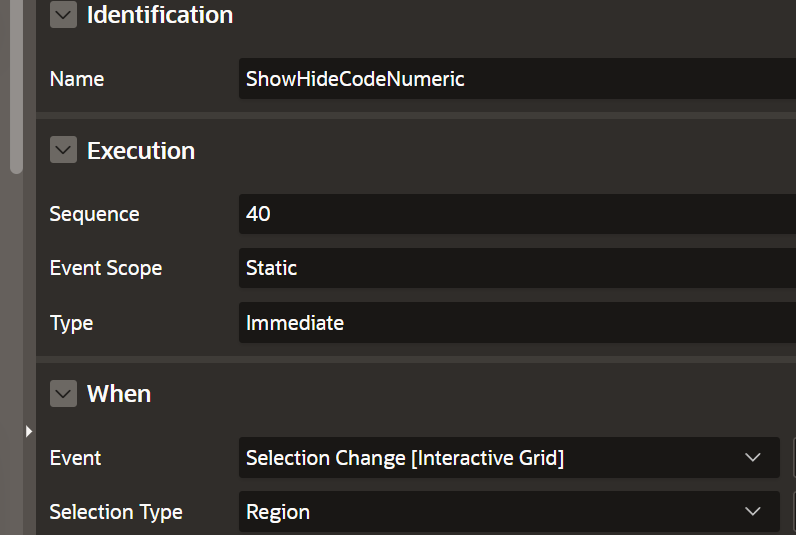
True Action:
About the author
Databaseguy, Oracle Apex Lover
Comments
Join the discussionNo comments yet. Be the first to comment.
APEX Implemented Correctly? YES/NO?
The series is a exploration of Oracle APEX settings and configurations, focusing on ensuring they are optimized and aligned with best practices.
